To use the Chem Finisher in Probably Stolen, insert a container of sufficiently dry processed material, select the matching product recipe, and press Output. For Dream Dust and Caffeine Pill, that means removing the water and alcohol before attempting to package the ingredient. The machine handles final packaging, so selecting a product cannot make up for a missing extraction stage, and a batch with too little active reagent still cannot complete its selected recipe.
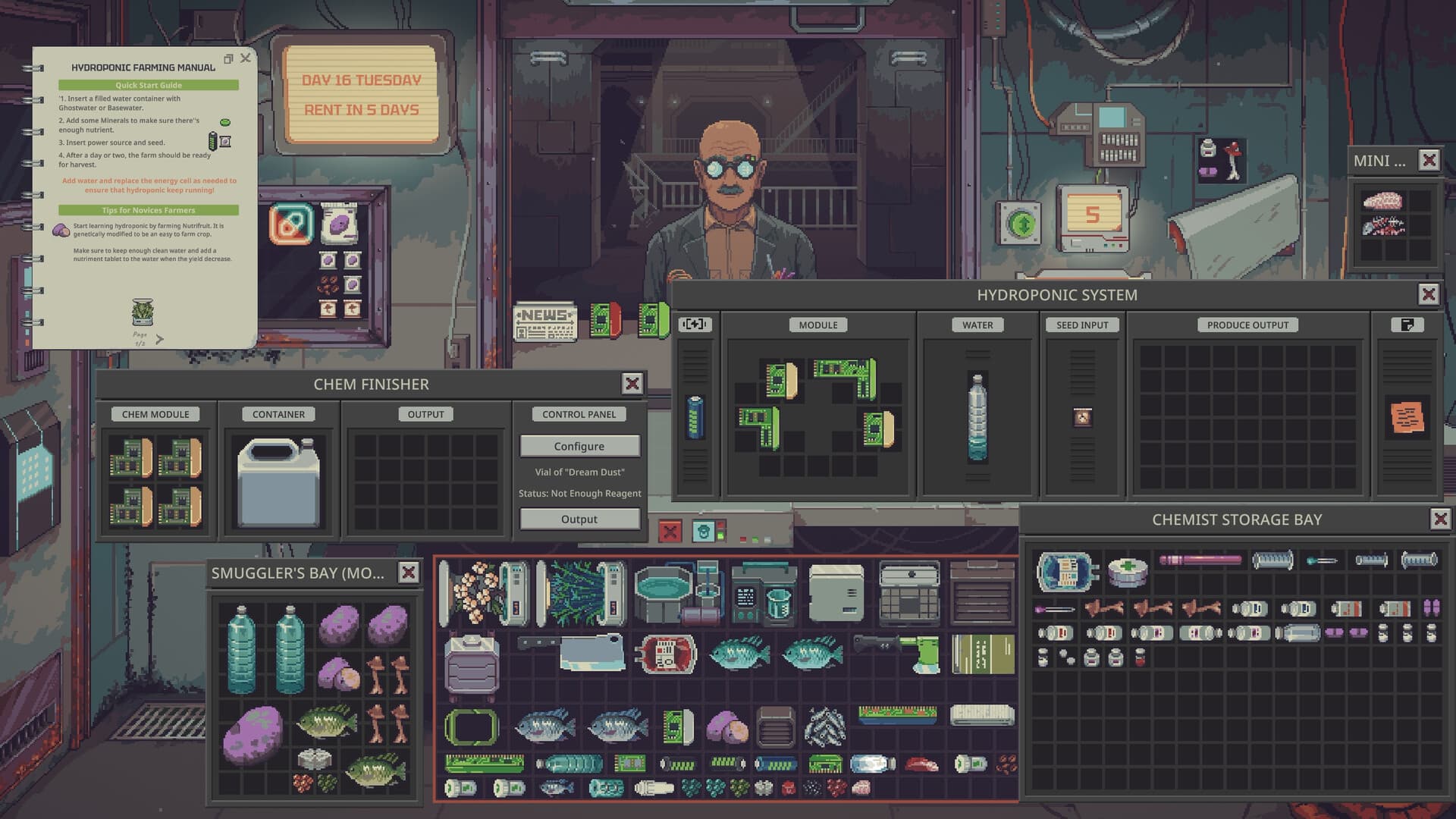
Select the product before pressing Output
For Dream Dust, bring the dry extract to the Chem Finisher and open its control panel. Choose Configure, select Vial of Dream Dust from the available recipes, and press Output when the recipe is ready. You can continue producing vials while enough processed material remains, but check the selected product before packaging because the machine also offers other chemical products, including Caffeine Pill.
The Dream Dust recipe requires 2.00 mL of processed material per vial, while the Caffeine Pill recipe lists a required volume of 5.00 mL. Treat these as the respective recipe volumes rather than interchangeable settings for every product. The Dream Dust amount does not mean that the entire vial contains pure Dream Cap Extract, and the Caffeine Pill input must also satisfy its restriction against wet ingredients.
Prepare Dream Dust through extraction and filtering
Dream Dust production moves from Dream Caps to Dream Cap Mush, then Dream Cap Extract, dry extract, and finally the packaged product. Start by attaching a liquid container to the Blender's CONTAINER slot, placing Dream Caps in the ingredient input, and pressing Start. The resulting mush collects in the attached container; it still needs the extraction stage before it can become the dry material intended for the Chem Finisher.
Move that container to the Heating Plate and add Alcohol equal to 3–6 times the volume of Dream Cap Mush. Heat the mixture to 40–60°C to turn the mush into Dream Cap Extract, taking care not to overheat the valuable ingredient. After extraction, you may filter the solution with Kotton Fabric to remove large contaminants; this optional step comes before evaporation and can help improve the quality of the finished product.
Use the Composition Spectrometer on the heated mixture before putting the batch through overnight evaporation. This check helps distinguish extract destroyed during heating from an ingredient that simply needs more drying time. If the extract was already destroyed by overheating, further evaporation cannot recover it, so returning that damaged batch to the drying stage does not repair the earlier extraction problem.
Use the separate Caffeine Pill preparation
For Caffeine Pill, attach a liquid container to the Blender and process Coffee Beans into Coffee Beans Mush. The basic preparation recommends Alcohol equal to 3–6 times the mush volume, then heating the mixture on the Heating Plate to at least 80°C. Caffeine is more heat-resistant than the material in the Dream Cap recipe, so applying the Dream Dust extraction temperature to this preparation would overlook its different heating requirement.
Filter the caffeine mixture when needed, then evaporate the remaining water and alcohol before taking it to the Chem Finisher. Select Caffeine Pill for packaging the dry Caffeine, rather than leaving the machine configured for Dream Dust. The relevant active ingredient for this product is Caffeine, whereas Dream Dust depends on Dream Cap Extract, so check both the recipe choice and the composition of the material you prepared.
Dry the material and verify what remains
Place the mixture's container in the Evaporator's CONTAINER processing slot and make sure an Energy Cell supplies power. The Evaporator works overnight to remove liquids such as water and alcohol, so inspect the result the following day. Putting the container through that overnight stage is part of preparing dry input, but the elapsed night alone does not establish that every batch is ready for its selected Chem Finisher recipe.
Larger batches and mixtures containing additional solvent may need multiple nights before their water and alcohol have disappeared. Use the Composition Spectrometer, also called the Chem Scanner, to inspect the container's composition and determine what remains. Continue evaporation as necessary until the material meets the selected recipe's drying requirement, rather than assuming that a completed overnight cycle guarantees complete drying regardless of the batch's volume or remaining solvent.
Resolve wetness and reagent warnings separately
Wet Ingredient Detected means that the current input has not met the Chem Finisher's dry-ingredient requirement. Return the mixture to the Evaporator and check that the Energy Cell can support overnight operation, the container occupies the processing slot, and water or Alcohol is not still present. Account for a larger batch taking longer to dry, then run another night when necessary and inspect its composition again before retrying the packaging step.
Not Enough Reagent means the selected product lacks enough usable active ingredient to complete its recipe. A container can hold a substantial volume while containing too little Dream Cap Extract or Caffeine because much of its contents may be solvent, water, or unwanted material. If both warnings appear for the same batch, resolve the wetness first and then confirm whether the remaining active ingredient is sufficient for the product you selected.
Check purity after packaging
Use the Composition Spectrometer on the finished chemical product as well as on the liquid container during preparation. Producing more vials or selecting the correct recipe does not guarantee better merchandise when extraction or filtering has left too many impurities. Filtering removes large contaminants, evaporation removes water and alcohol, and the Chem Finisher packages what remains while potentially introducing additional impurities of its own.
The listed higher purity grades are Pure Grade at 99%+ with +135% of base value, Pharma Grade at 90–99% with +85%, and Near Pharma at 80–90% with +40%. Street Standard at 60–80% has no price modifier, while Cut Product at 45–60%, Junk Grade at 30–45%, and Starch Grade below 30% carry modifiers of -45%, -75%, and -95% respectively. These published ranges share boundaries without specifying the exact classification at those boundaries, so they do not establish which adjacent grade applies to an exact boundary reading.
A Labeler changes the displayed product label without increasing the product's actual purity. Some customers carry a Chem Scanner and can compare the labeled purity with the chemical's real composition. Check the finished product before deciding to deliver or sell it, using that composition reading to assess the batch rather than treating a different label as an improvement to the material.
Match upgrades to the production stage
Upgrading the Chem Finisher can reduce the impurities it introduces during final processing. Most chemistry machines use special Chemical Equipment Modules, while the Evaporator uses normal modules and can improve energy efficiency and the amount of liquid processed each night. That distinction matters when choosing equipment improvements: cleaner final packaging and greater overnight drying capacity address different parts of the preparation chain.
The Blender's upgrades improve extraction yield, while Heating Plate upgrades affect maximum temperature, temperature control, and heating speed. These improvements apply before packaging, where the Blender makes mush and the Heating Plate extracts the desired chemical. Choose the stage that matches the problem you found in the batch, keeping extraction, drying, and final packaging distinct when assessing what an equipment upgrade is intended to improve.